Archivo:Dandelion clock quarter dft dct.png


Resumen
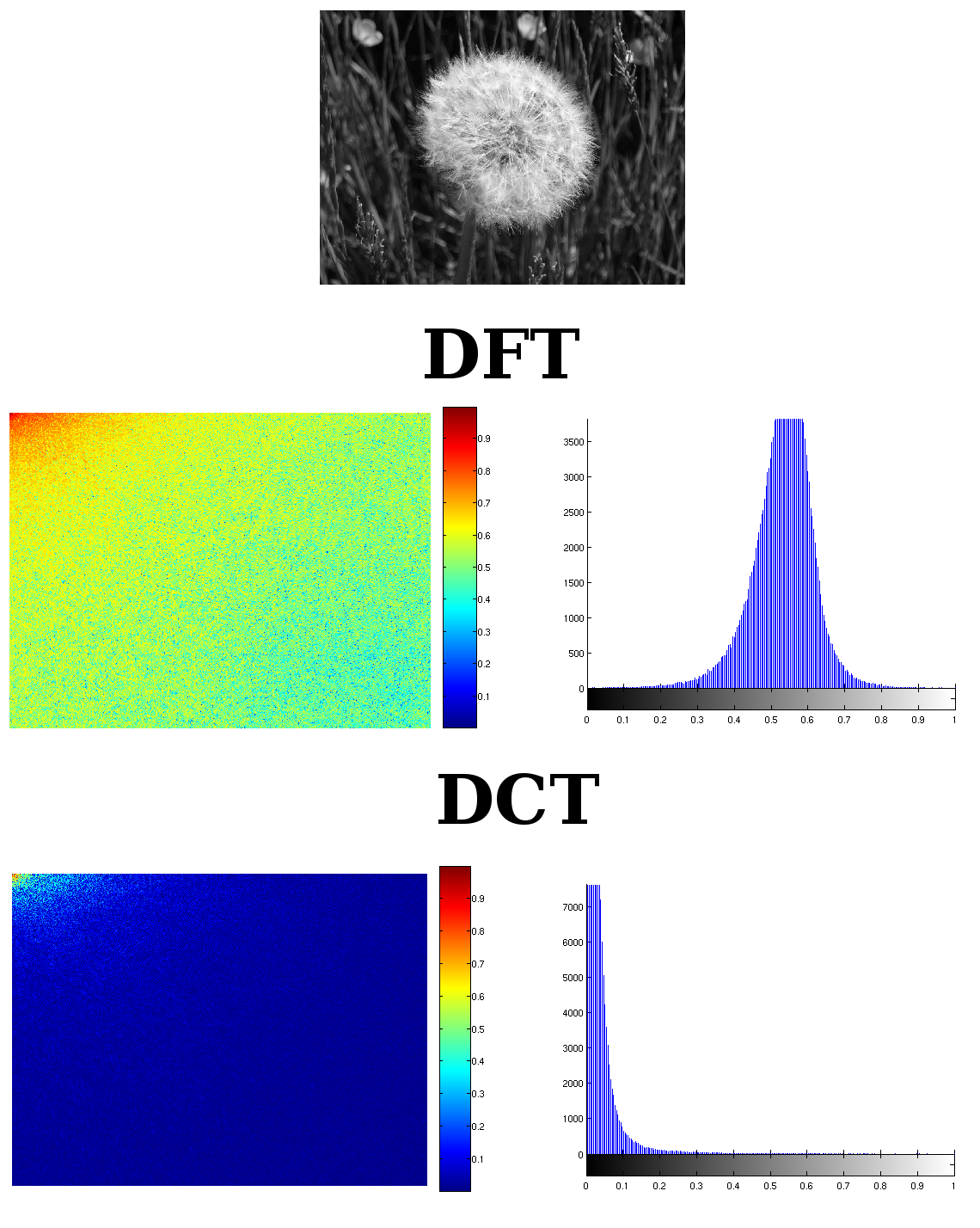
| Descripción | the picture shows the difference between the DFT and a DCT of an image |
| Fecha | |
| Fuente | I made it by myself |
| Autor | Alessio Damato |
| Permiso (Reutilización de este archivo) |
multilicensed (see below) |
| Otras versiones | the original image that was processed was Image:Dandelion_clock.jpg |

I used Image:Dandelion_clock.jpg to create this image. I wanted to show clearly the different behavior between the DFT and the DCT in the frequency domain.
The pictures are made of other figures. The first one on the top is just the original image: I used its gray-scale version. On the second line there is the DFT: its magnitude on the left, its histogram on the right. On the third line there is the DCT, with both magnitude and histogram.
The spectrum of the DFT has cropped so that the lowest frequencies are on the top-left of the picture, just like in the DCT. It is not such a rigorous process: the DFT in general is composed of two symmetric halves, but I put on the picture just one quarter, thus removing one quarter of necessary information. I did so to create an output that could be easily be compared with the DCT. Because of symmetry, I cropped to 1/4 the DCT as well, keeping the lower frequencies. Anyway it is clear how the DCT concentrates most of the energy into the lowest frequencies.
I created the single images with the following Matlab code:
% read the image
RGB = imread('Dandelion_clock.jpg');
% convert pixels to the [0 1] range
RGB = im2double(RGB);
% convert to grayscale
I = rgb2gray(RGB);

% calculate the size of the image and then divide
% by two, in order to crop it later
[X Y] = size(I);
Y = round(Y/2);
X = round(X/2);

% evaluate magnitude of the DFT
F = abs(fft2(I));
% take only a quarter
F = imcrop(F,[0 0 Y X]);
% use log scale
F = log(1 + F);
F = log(1 + F);
% normalize
F = F/max(F(:));

% evaluate magnitude of the DCT
C = abs(dct2(I));
% take only a quarter
C = imcrop(C,[0 0 Y X]);
% use log scale
C = log(1 + C);
C = log(1 + C);
% normalize
C = C/max(C(:));

% show all the results
imshow(F), colorbar, colormap(jet);
figure, imhist(F);
figure, imshow(C), colorbar, colormap(jet);
figure, imhist(C);
First it imports the RGB image and converts it to gray-scale. Then calculates the magnitude of both the transforms. Both pictures had a huge dynamic, so I calculated the logarithm of both, twice, in order to be able to show the transforms properly. Once all the pictures were shown on the screen, I just selected File -> Save as on Matlab to save all the pictures. I put them all together using Gimp.
(comment by RCL) I cant speak english very well, but I'm going to try it. The use of this code it's WRONG, we can't use this MATLAB code for comparing both transforms, because in MATLAB the definition of the DFT isn't normalized and the definition of the DCT in MATLB it's normalized. So we should multiply the result of the fft by a factor of 1.0/N², before we use the function abs. The result between the DFT and the DCT is very similar if we do this, but we can obtain the shannon entropy of the energy of both transforms and the result is that the entropy of the energy in the DCT is lower than the DFT, for that reason we say that the DCT compact the energy more than the DFT. I made my master thesis on the DCT.
Licencia

|
Se autoriza la copia, distribución y modificación de este documento bajo los términos de la licencia de documentación libre GNU, versión 1.2 o cualquier otra que posteriormente publique la Fundación para el Software Libre; sin secciones invariables, textos de portada, ni textos de contraportada. Se incluye una copia de la dicha licencia en la sección titulada Licencia de Documentación Libre GNU. |
  
|
Este archivo se encuentra bajo la licencia Creative Commons Genérica de Atribución/Compartir-Igual 3.0. | |
| ||
| Esta etiqueta de licencia fue agregada a este archivo como parte de la actualización de la licencia GFDL. |

- Eres libre:
- de compartir – de copiar, distribuir y transmitir el trabajo
- de remezclar – de adaptar el trabajo
- Bajo las siguientes condiciones:
- atribución – Debes otorgar el crédito correspondiente, proporcionar un enlace a la licencia e indicar si realizaste algún cambio. Puedes hacerlo de cualquier manera razonable pero no de manera que sugiera que el licenciante te respalda a ti o al uso que hagas del trabajo.
- compartir igual – En caso de mezclar, transformar o modificar este trabajo, deberás distribuir el trabajo resultante bajo la misma licencia o una compatible como el original.
Historial del archivo
Haz clic sobre una fecha y hora para ver el archivo tal como apareció en ese momento.
| Fecha y hora | Miniatura | Dimensiones | Usuario | Comentario | |
|---|---|---|---|---|---|
| actual | 19:50 13 may 2006 | | 1140 × 1428 (542 kB) | wikimediacommons>Alejo2083 | == Summary == {{Information| |Description= the picture shows the difference between the DFT and a DCT of an image |Source= I made it by myself |Date= 13/05/2006 |Author= Alessio Damato |Permission= multilicensed (see below) |other_versions= the original |
Usos del archivo
La siguiente página usa este archivo:
